I've designed a new course at the Academy of Art University
"ANM_499_19: Special Topics: Human and Animal Locomotion"
In the time been It's given a green light, but I need more students enrolled.
If you think this class may be of interest to you, sign up or tell others about it.
Here's what this new class will be about:
I will teach the wide range of locomotion -
biped walk, run, sneak (both cycles and non-cycles),
quadruped walks, runs, gallops (both cycles and not),
bird and lizard walk/run.
I will re-enforce the meaning of Animation work flow consisting of
"Layout-blocking-animation-polishing" and
"Extremes-Breakdowns-in-betweens", character setups.
I think this is very important topic, rather under-represented.
The new class will focus on the expressive locomotion without distraction of acting shots.
Take a look at the Outline here: http://discussion.academyart.edu/onCampusCourseContentOutline?section=94995
We need at least 5 more students for it to roll out.
I'm counting on you.
Thanks.
Monday, August 26, 2013

Tuesday, May 28, 2013
Hey everybody.
I'm trying a new (for me) thing: Online video animation course.
Please take a look at it and give me your opinion. You may also leave your positive review on the site.
It's here:
https://www.udemy.com/intro_to_locomotion/

I'm trying a new (for me) thing: Online video animation course.
Please take a look at it and give me your opinion. You may also leave your positive review on the site.
It's here:
https://www.udemy.com/intro_to_locomotion/
Wednesday, April 18, 2012
Michael Berenstein
Animator
677 35th Ave
San Francisco CA
94121
Tel: 415/750-1355
Email:berbentos@yahoo.com
Character 3-D Animator: features, shorts and commercial production, Animation instructor.
Objective
To teach animation, animation principles, techniques, bringing ideas from my experience as Russian and American Animator, years of professional involvement in the field. I like to use class discussions, bring unexpected ideas and common sense.
Career history
Animator
677 35th Ave
San Francisco CA
94121
Tel: 415/750-1355
Email:berbentos@yahoo.com
Character 3-D Animator: features, shorts and commercial production, Animation instructor.
Objective
To teach animation, animation principles, techniques, bringing ideas from my experience as Russian and American Animator, years of professional involvement in the field. I like to use class discussions, bring unexpected ideas and common sense.
Career history
Animation Instructor 2009-current
Academy of Art University
San Francisco Ca
Teaching classes and One-on-One full time students, advanced level, using lecture, practical demos and individual critiques.Main objective is to prepare students for professional application in the field of 3D computer animation.
Animation teacher Summer 2004 - curent (on and off)
De Anza CollegeCupertino Ca
Taught various classes. Managed a class of 32 pupils, all with different backgrounds, different level of preparedness. Was able to switch on a fly between advanced students with complex storyboards and true beginners without prior animation experience. Main objective has always been to keep ideas simple, enabling students to complete them at least on the level of animatic in reasonable time.
Character Animator 2006-2008
Pacific Data Images/DreamworksEmeryville Ca
Worked on Animated Feature "Madagascar II". Animated most of the characters.
Character Animator 2004-2005
Tippet Studio
Berkley Ca
Tippet Studio
Berkley Ca
Animated Timpleton-the-Rat for Charlotte's Web, Worked on Commercials for Milka Chocolate. Combined real like like Rat animation with acting, adjusting animation to Clients' direction. Worked with a team of fellow animators to create seamless transitions between the shots.
Character Animator 1994-2003
Pixar Animation Studios
Emeryville Ca
Animated characters for Pixar’s projects following Directors’ input
As part of Pixar team, participated in creation of all classic features and various shorts of the Studio: Toy Story, Toy Story 2, Bug’s Life, Monsters Inc., Finding Nemo, Geri’s Game, For the Birds, etc.
Added an element of irony and subtle humor to the shots: wimpy, un-hero like behavior of Woody, Mussolini-esque Molt in Bug’s Life etc.
Each shot is an achievement in itself, please refer to the reel.
As directing animator on CD-Rom project for Intel, created storyboard and supervised production of demo reel for the client, trained new animators and got them “Production ready”. Two of them are employed by Pixar, others went on to other studios (all are working in the field).
Puppet Animator 1993-1994
Danger Productions
Brisbane Ca
Animated puppet characters for TV series “Bump in the Night”.
Added to the overall quality of animation in a crew of mostly fresh out of school animators.
Animated some of the best selling shots: Bumpy and Squishy singing, dancing bugs at the bar.
Helped to design rig to suspend puppets in the air, designed rigs for various purposes.
Puppet Animator, freelance 1993
Studio Colossal
San Francisco, Ca
Animated “walking dollar bills” for Miller Genuine Draft commercial. Helped to design workable rig for “bendable” dollar bills.
Animator 1991-1993
Will Vinton Studio Claymation
Portland, Ore
Designed and animated clay characters for the 1-minute long shorts for Disney Channel’s “Alice in Wonderland, using unique Clay-on-glass technique.
Actively participated in design of the layered glass rig. Improved the rig by adding two more glass layers.
Worked independently, with very little supervision from the Director.
To complete “Prince’s Shoes” in a very short time, quickly searched for and hired an animator from Russia to finish the spot , which ended up being one of the best short of the series.
Camera Assistant, Animator, Director 1984-1989
Belarus film
Minsk, Belarus
Camera Assistant, Set Designer, Prop Builder, Animator, Director.
Went from Camera Assistant to animator and directed own spot for Mini-Max Festival in Warsaw, Poland.
Education
Degree in Architecture from Byelorussian Polytechnic Institute in Minsk, Faculty of Architecture. Equivalent of Master’s Degree. MFA equivalency from De Anza Community College.
9 Months Moscow Course for Animators.
Professional Development
PDI proprietary software EMO, Pixar’s proprietary software “Menv”, Maya (animation and modelling), Zbrush.
Special achievements
Double winner of Pixar’s International Paper Plane Contest. The only performer of a unique mystical “Perpetual Glider” act. True Miracle.
References available upon request.
Monday, January 9, 2012
Conductor
Another idea is Conductor, conducting the wrong music. Same as the wrong written speech, only with character.
Here's my video footage. Click here.
A little too long, a little less expressive than I need. OK, let's find extremes and create a "cheat sheet" with them.


 Because this is complicated shot, with lots of small movements, it's hard to see what's going on simply by looking at the snapshots. So we need to put it together, using any of the editing software: Windows Movie Maker, Premiere, After Effects, Ulead Studio, iMovie. I'll use Windows Movie Maker.
After playing with lengths of the snapshots, removing some of them to make movements clearer and shot shorter, here is the result: click here
But frankly, I'm not satisfied with the video. Lots of details are lost and the movement is not that clear. So I think I will need the help of the Breakdowns. So I'll do another pass with selecting snapshots, this time selecting Extremes and Breakdowns. Again, after playing with the lengths of the snapshots, removing parts of the shot to make movements simpler and the shot shorter (we need 150-ish frames, about 6-7 seconds),
I ended up with this "blocking": click here
As you see, I added the ending, which I cut off from my first blocking.
Now I can start real blocking of the shot in Maya, using CG character. I begin to feel better about the shot, having set main movements, body language, Extremes and Breakdowns. Now I will need to exaggerate some movements, simplify them and make sure the face is much more expressive, than in the Video Ref.
Here's my video footage. Click here.
A little too long, a little less expressive than I need. OK, let's find extremes and create a "cheat sheet" with them.
After playing with lengths of the snapshots, removing some of them to make movements clearer and shot shorter, here is the result: click here
But frankly, I'm not satisfied with the video. Lots of details are lost and the movement is not that clear. So I think I will need the help of the Breakdowns. So I'll do another pass with selecting snapshots, this time selecting Extremes and Breakdowns. Again, after playing with the lengths of the snapshots, removing parts of the shot to make movements simpler and the shot shorter (we need 150-ish frames, about 6-7 seconds),
I ended up with this "blocking": click here
As you see, I added the ending, which I cut off from my first blocking.
Now I can start real blocking of the shot in Maya, using CG character. I begin to feel better about the shot, having set main movements, body language, Extremes and Breakdowns. Now I will need to exaggerate some movements, simplify them and make sure the face is much more expressive, than in the Video Ref.
Thursday, January 5, 2012
Eating the wrong stuff
Let's consider more complicated case of classical shot: "Eating the wrong stuff".
The point of a shot is to create change of emotion. Let's act it out first: a character is sitting at the table and eating something. Then realizing it's the wrong food. I came up with the opposite idea: the character doesn't really want to eat, tries some, and realizes it's very tasty. The shot ends in energetic chomping.
Here's my acting, click here.
Using method, described in "working with Video Reference" I selected the Extremes:


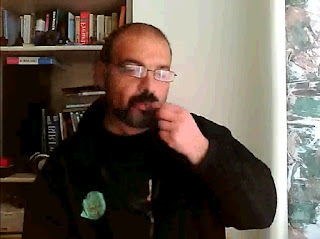


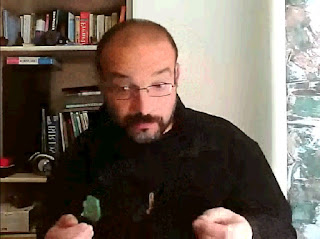


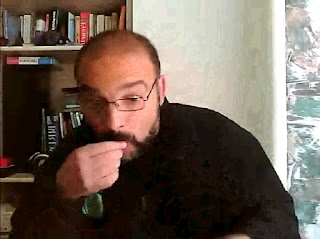
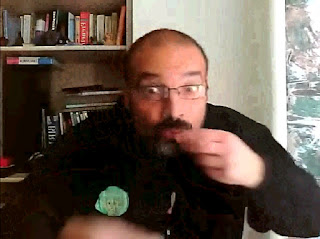


The point of a shot is to create change of emotion. Let's act it out first: a character is sitting at the table and eating something. Then realizing it's the wrong food. I came up with the opposite idea: the character doesn't really want to eat, tries some, and realizes it's very tasty. The shot ends in energetic chomping.
Here's my acting, click here.
Using method, described in "working with Video Reference" I selected the Extremes:
And to check if the Extremes are selected correctly, I put them into Windows Movie Maker. After playing with timing, here is what I came up with: click here
To check if the movements are working, I need to insert Breakdowns. So I'm back at my Live Video to search for the Breakdowns (and, if necessary, In-betweens). Having selected the snapshots that, I think, may serve as Breakdowns, I insert them between Extremes in my Windows Movie Maker and, after playing with the timing, record a new movie. Click here.
Note that in the end I re-used last two eating snapshots. My recording was skipping frames and I don't have some of the Breakdowns, but I think I will be able to create them on my own, while animating.
All we need to do now is to open Maya and start creating those Extremes, trying to make them as close to the snapshots as possible. I'd use most important facial expressions, but leave chewing for later. If necessary, I'll make chewing snapshot reference. I'll try to come up with animating this shot, but I may not have time for it. Stay tuned.
Tuesday, December 6, 2011
Moving holds
Usually, holding a CG object for several frames without movement is considered to be a NO-NO. There MUST be some movement, even if very small. Here's one easy way to do that.
Let's bring the cube and make some simple animation with it.

Red outline is previous position of the cube. Yellow and blue arrows are directions of the movement. Brown ovals and rectangles are the holds.
Playblast
Let's curve those holds now, so the cube doesn't feel like sticking.
We'll do it manually this time.

Red dotted lines are the previous flat positions of the curve. Yellow arrows show directions of the knots shift. Yellow rectangles in timeline are the holds (moving holds they are now).
Playblast
Done deal.
Now let's consider more complex situation. We'll add rotations to the movement.

Playblast
If we will decide to work manually, we'll have to work with every curve. The big problem here is proportion. The bigger movement "1" must be adjusted more and the smallest "2" - less. But how do we know how much?
There is a very convenient way to do it easy, at least for the bulk part, and forget about the problem, at least for a while - using Middle Mouse Drag and Drop function in the Timeline.

We need to make red curve to look like yellow dotted line.

So we need to lower the knot on frame 18 to be at the level of blue knot (blue arrow points at it).
Move the mouse in the Timeline until red crossline intersects the curve approximately where blue dot is. In our case it will be frame 17 (in blue circle)
Press Middle Mouse Button (MMB), hold it down and move cursor from frame 17 to frame 18. Release MMB and ...

hit 'S' on the keyboard.
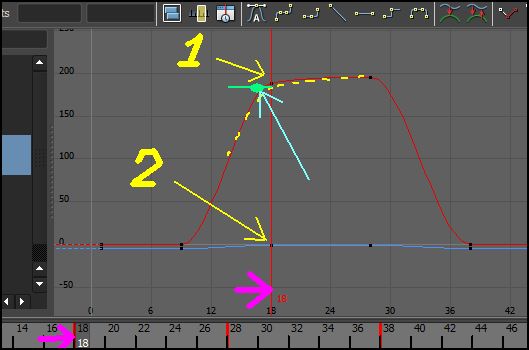
There you go.
But notice that not only red curve moved, but also the blue.
And if we hit 'A' in Graph Editor window, it will maximize the view and we'll see that Blue curve(TrZ) almost exactly follows Red one (RotX). I think it means that it has the same proportion of curvature as the Rot X.

It happens to all curves.
Green arrows show direction of the MMB drag and drop.

Playblast
MMB is one of the most important tools for animation. Use it.
Subscribe to:
Posts (Atom)